
Use cases
What teams actually use gjalla for: seeing what agents are doing, cutting token spend, applying rules and process consistently, and building memory that compounds.
Developer platforms were built to manage the codebase and the metadata humans needed to build against it. That assumed a human was the one holding context.
Agentic development breaks the assumption. What determines the quality of an agent’s output is no longer just the code, it’s the rules, memory, skills, and system context the agent uses at runtime. A whole new layer of metadata that our systems were not built to manage. Even more importantly, it’s not just data that’s read, but data that’s used as instructions and guardrails.
This brings interesting new challenges for teams. Our stacks were not designed to maintain a data layer that’s not only executable but also must be living.
gjalla gives you control over that layer. Everything we do is toward high quality, lower cost, and fewer surprises. Here are outcomes our teams achieve:
Visibility and measurement into agent activity
While your agents work on their tasks, they are loading skills, reading memory, and touching various parts of your system. All of these categories are levers you can pull to improve their performance and trustworthiness, but first you need visibility. You can’t improve what you can’t measure.
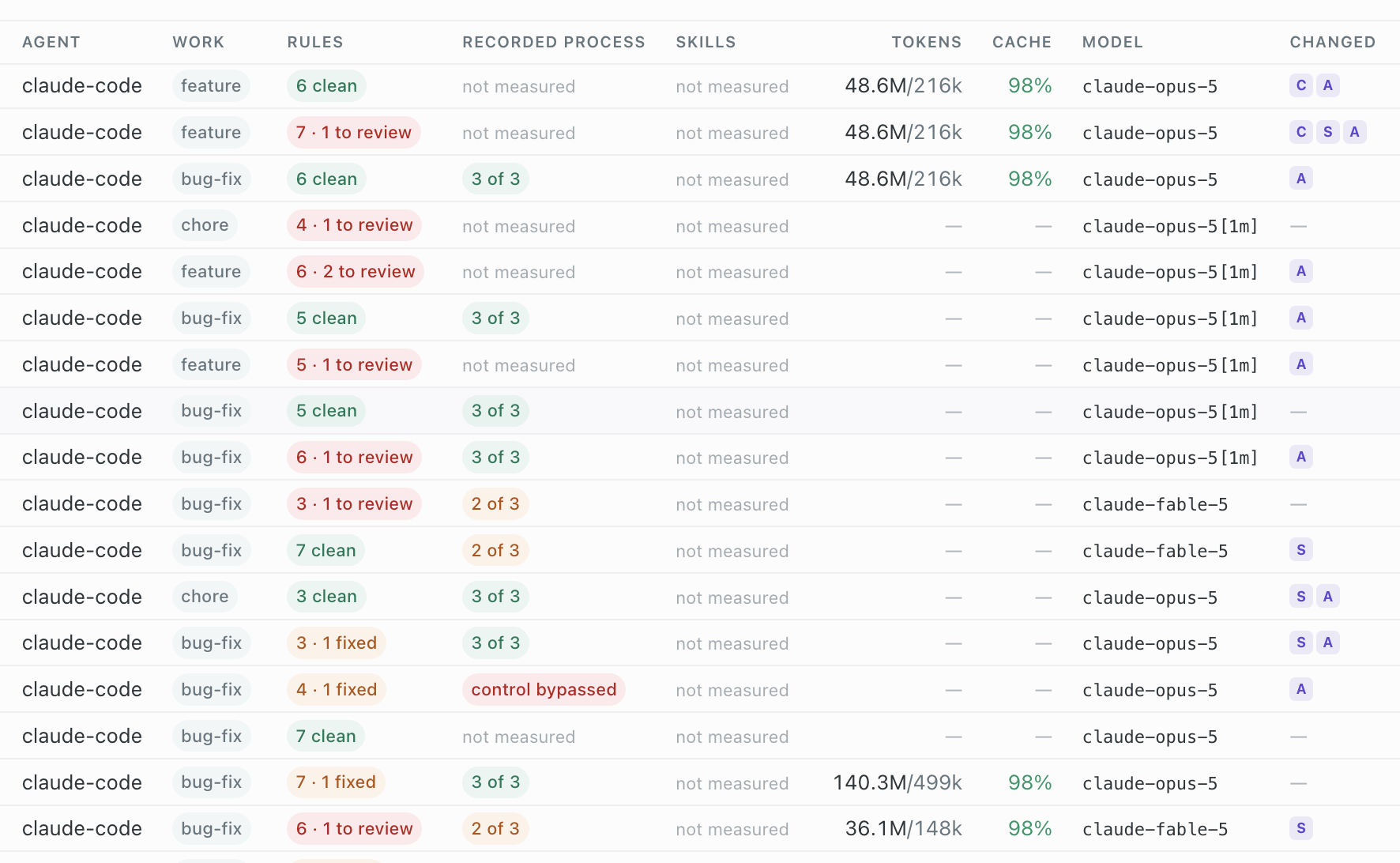
Do you know the source of the skills your agents are running? Do you know that none of the skills are malicious? Where are your agents sourcing their memory from? Is the memory clean and accurate? Are your agents bound by the rules you’ve set? Do they follow them?
When one team’s output is better than another’s, this is how you tell whether that’s the people, the codebase, or the fact that their agents were working from different context entirely.
gjalla session show   # context window makeup, tools used, files touched, process followed
gjalla log            # what has changed about the system, and when
gjalla log --findings # what needs attention
Save on token costs
A massive amount of token burn is not necessary and can be avoided by managing this new data layer that emerges in agentic development workflows. Without it, you’re paying your agents to discover and learn the same facts over and over, and expending tokens reworking code your developers would never have written.
Why does my agent re-read the same files at the start of every session? Why is it exploring my repo instead of doing the task I gave it? Why did I pay twice for work that came back wrong the first time? Why is my bill going up faster than my output?
Both halves are avoidable. Rediscovery goes away when the architecture, conventions, and prior decisions are maintained instead of re-derived every session. Rework goes away when the agent had your standards before it wrote, rather than meeting them in review.
Within a session, we’ve seen token savings between 23% and 90% depending on the use case. In broader workflows, we see a reduction in rework and avoidance of endless merge-blocking whack-a-mole loops.
Apply rules and process consistently across your agents
Agents don’t inherently know your standards, your practices, or your expectations. They don’t know the requirements that aren’t directly specified in their plans. gjalla lets you define natural language rules, then translates them into the most effective delivery mechanism for the agent. Sometimes that just means steering, other times it means a deterministic hook. Whatever it is, gjalla helps you apply them worry-free.
How do I stop my agents contradicting each other? Why does every developer’s agent behave differently in the same repo? How do I keep Claude Code, Cursor, and Codex working to the same standard? How do I stop an agent using a pattern we moved off two quarters ago? How do I make sure a rule is actually followed, not just mentioned? How do I keep a new repo from starting from scratch on all of this?
Rules are versioned and scoped, so a project constraint doesn’t leak into an unrelated repo, and a change propagates instead of being re-litigated per team. Process rules compile into each agent’s native hooks, which is the difference between a rule an agent can talk itself past and one it cannot.
gjalla rules show    # the constraints, ahead of the work
gjalla rules check   # check the current state against them
gjalla sync          # distribute rules and skills into each agent's own files
Secure, shared, living memory to compound agent productivity
Your organization is complex. Different teams are building different things, seeing different insights, and accessing different data. Durable memory in such environments is hard, and requires its own management. Good memory is an incredibly effective lever toward cost savings and quality improvements. gjalla helps organizations tackle durable knowledge, securely and at scale. This means cleaning, curating, tagging, and access controlling, all so your agents can focus on the task at hand.
Why do I keep making the same correction over and over? How do I stop my agents relearning things we already figured out? How do I share what one agent learned with everyone else’s agents? How do I keep stale or wrong facts from persisting once they stop being true? How do I let teams share knowledge without leaking what they shouldn’t see?
Saved facts are scoped and versioned, so a fact that turns out to be wrong can be archived rather than quietly outliving its truth. Recurring findings and accepted corrections are the raw material for new rules, so the things you keep catching become the things that stop happening.
gjalla memory show                        # what earlier sessions learned the hard way
gjalla memory save "<the fact>" -n "<name>"
Where to start
Most teams start with rules and process, because it is the pain that shows up first and the shortest path from install to a visible difference.
If you are expanding agents across more than one team, start with visibility instead. The problem there is not any single agent’s output, it is that every team is running a different setup and nobody can see it.
New to gjalla entirely? How gjalla works is the whole model in one page, and Quickstart gets you connected.